Icon Icon Icon Follow Me on Pinterest YouTube Icon
Tampilkan postingan dengan label Printer. Tampilkan semua postingan

Sabtu, 17 Januari 2015

Resetter Epson L110 L210 L300 L350 L355

If Epson L110 L210 L300 L350 L355 stop or strike print, the printer Epson L110 L210 L300 L355 L350 you ask reset. Here's how to reset epson L110 L210 L300 L350 L355:

1. Turn on the printer and printer driver must be installed on the computer.
2. Download the program Resetter Epson L110 L210 L300 L350 L355, at the following link:

Download Resetter Epson L110 L210 L300 L350 L355

3.Run program Resetter Epson L110 L210 L300 L350 L355 with a double click Adjprogcracked.exe
4. Then follow these guidelines the following picture:
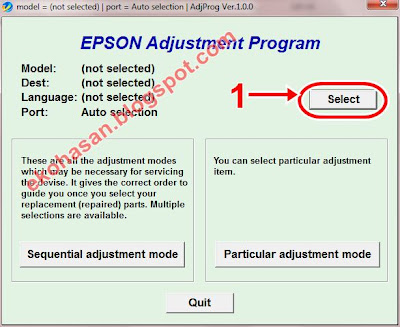


 Once you execute the instruction corresponding sequence of images, Your Epson L110 L210 L300 L350 L355 will be ready for use again. Good luck.
Read More

How to Reset Printer Epson Stylus C58

How to reset epson stylus C58 printer there are 2 ways.

If you use the first method using v4.3 SSC program fails, maybe you can try the following manner.


How to reset epson stylus C58 printer which I will review it together in a way to reset the Epson Stylus C90 and R270. The only difference being only reseternya program and date of operation.


Here's how to order Epson Stylus C58 reset:
1. The first step of course, the printer driver must be installed. To download click on the driver download driver epson.

2. Download software resetnya first. Software named Resetter Stylus C58 You can download it here Klik 


3. Change the computer's date to 9 November 2006, the only way for this program on that date.

4. Run the program by double-clicking resetnya "AdjProg.exe"

5. Then follow the following picture:


6. Turn the printer off and then ready for use again.

If an error occurs when running the program resetter, follow these steps:


     Delete the folder in "C: \ Adjustments_Programs \ Stylus XXX" on your PC.
     Sign in to RUN type regedit continue to find the following location: HKEY_LOCAL_MACHINE | SOFTWARE | EPSON | PT Semen Gresik | Stylus CXX.
     Delete the registry key "CXX or Stylus Stylus RXX"
     Then restart your PC and then try to run the program resetnya do not forget to reset the date adjusted where it can be run.


Good luck ............ ......  Hopefully Helpful ......
Read More

Lorde

Twitter Feed

Facebook Page

© Romeo Nusantara All rights reserved | Designed By Blogger Templates